Nesting Wizard
Rectangular & Square DXF Nesting — Holes, Notches & Rectangle-Like Profiles
Browser nesting with lenient rectangle/square classification—solid blanks or rectangle-like DXFs with holes, pockets, and modest notches stay on our orthogonal-first pipeline; rotations where allowed and CAM-ready exports.
Sheet2Nest evaluates outer outlines with tolerant envelope checks before nesting: profiles that still read rectangular or square—including parts with mounting holes, internal pockets, tabs, or light notching—often remain categorized as rectangle/square rather than jumping straight to irregular handling. Orthogonal inventories therefore stay on the pipeline path we optimize hardest—many shops report predictable, reliable nesting on rectangular-heavy jobs with standard CAM exports. Exact utilization vs. naive layouts still depends on stock size, margins, kerf, and mix.
At a glance
Quick checklist of how Sheet2Nest handles orthogonal and rectangle-like cutting files from upload to export.
- Rectangular nesting in your browser — no install
- Square, rectangle, and rectangle-like DXFs for laser, CNC, plasma & routing — including profiles with holes, pockets, or modest notches
- Sheet optimization for panels, perforated rectangles, brackets, and orthogonal inventories
- Placing parts on sheet for cutting with live nesting progress and CAM-ready exports
- Lenient rectangle/square classification keeps envelope-true parts on the orthogonal-first nesting path
- Compare nested layouts and utilization before parts hit the shop floor
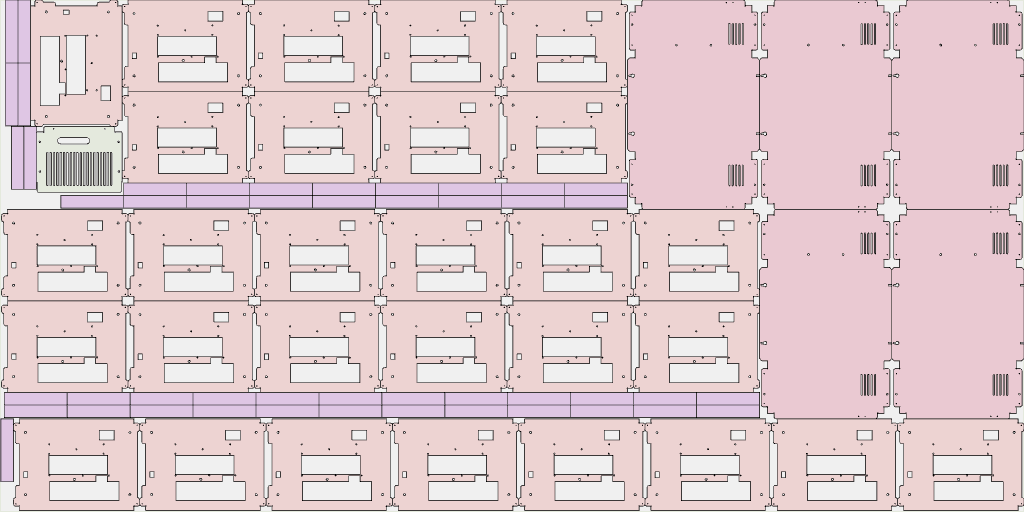
Real nest — rectangular & rectangle-like parts
Landscape sheet preview from Sheet2Nest: dense packing with panels, strips, and orthogonal profiles that include holes and internal cutouts—not only plain blanks.
Orthogonal jobs — where our nesting algorithm shines
Rectangle and square categories are assigned before nesting starts. Sheet2Nest deliberately uses lenient envelope logic on the outer profile—so mounting holes, internal cutouts, and small tabs or notches do not automatically disqualify a part from the rectangle/square lane when the outline still reads orthogonal. Rotations, footprints, and collision checks then stay on the orthogonal-first pipeline—not the heavier irregular trail—so rectangular-heavy DXFs typically move cleanly from upload to nested DXF with stable parts and predictable layouts.
Shops running cabinets, perforated brackets, signage plates, or rectangle-dominated cutting lists often describe these jobs as Sheet2Nest's easiest nesting— in practice, reliable rectangular nesting day to day when DXFs are standard CAM exports (closed contours, sensible layers). Deeply irregular artwork still nests on Sheet2Nest's general pipeline; orthogonal and rectangle-like jobs ride the lane we tune most aggressively.
Utilization vs. naive strip layouts varies by stock size, margins, kerf, and mix—as with any nesting solver. Parts whose outer envelope exceeds tolerant rectangle metrics route to concave, hybrid, or irregular categories—pair complex hole patterns with automatic part detection when outlines stop reading orthogonal.
Why orthogonal inventories fit Sheet2Nest
Three advantages teams notice when batches combine blanks with perforated rectangles, bracket plates with pockets, or other rectangle-like DXFs—not magic guarantees, just how Sheet2Nest classifies and nests orthogonal outlines.
Lenient rectangle & square classification
Sheet2Nest scores the outer outline with tolerant envelope checks—not just perfect four-sided blanks. Profiles that still read as rectangular or square—including mounting holes, internal pockets, tabs, and modest notches—can stay categorized as rectangle/square so rotations and nesting stay on the orthogonal pipeline instead of jumping straight to irregular handling.
Rotation when it helps
Rectangle-class parts can run at 0° and 90° when your DXF rules allow, tucking long bracket plates beside shorter pieces. Square-class parts stick to efficient orientations—ideal when batches mix solid blanks with perforated or notched rectangles.
Same exports as every job
Nested DXF, SVG previews, and PDF packets—the same CAM-facing outputs Sheet2Nest generates for mixed-shape nests.
Who this page is for
Ideal when most parts still look rectangular or square on the outside—even if they carry holes, slots, or light notching—or when your nest is dominated by those profiles.
Cabinet & closet shops
Panels, fillers, and door parts—often rectangles with hinge pockets or hardware holes—that still classify as orthogonal outlines for predictable nests.
Signage & acrylic
Blank plates plus routed pockets and bolt holes; rectangle-like outers stay on the nesting lane tuned for squares and rectangles.
Sheet metal & plate
Bracket plates with cleats or light notching—when the outer envelope stays rectangular, Sheet2Nest keeps the job on fast orthogonal placement.
Mixed DXF files still welcome
Real jobs mix blanks with machined rectangles and oddballs on the same sheet. Sheet2Nest still parses circles, hybrids, and irregular profiles alongside rectangle-class parts—this page highlights why perforated or notched rectangles usually behave like heroes inside Sheet2Nest.
- Outer outlines are evaluated with lenient rectangle/square rules—holes and modest protrusions often keep their rectangular classification.
- Rotations depend on whether a part is classified as rectangle, square, or irregular—see the smart placement page below for how that maps to angles.
- Export bundles stay aligned with what you see in the nested preview.
Rotation rules by part category are summarized on Smart placement & rotations.
More Nesting Wizard features
DXF processing
Nest DXF files in your browser with automated placement—sheet cutting optimization and CAD-friendly exports without installing desktop CAD.
Quick Add Part
Create rectangles, circles, brackets, and structural profiles from dimensions—live preview, queue multiple parts, and add them straight into nesting or cost quotes.
Part detection
Closed contours and holes are inferred from DXF geometry—less manual picking before you nest.
Nesting algorithms
Fast greedy plus optimized nesting for DXF sheets—many jobs reduce scrap 20%+ vs naive layouts; results vary by job.
Try it in the nesting wizard
Upload your DXF, review parts, set quantities, and export optimized layouts with utilization reports.
Start free nestingFeature: Rectangular nesting